
Pentest Chronicles
The Legacy of VB6 and the ClientSide Auth Bypass

Robert Kruczek
March 2, 2026
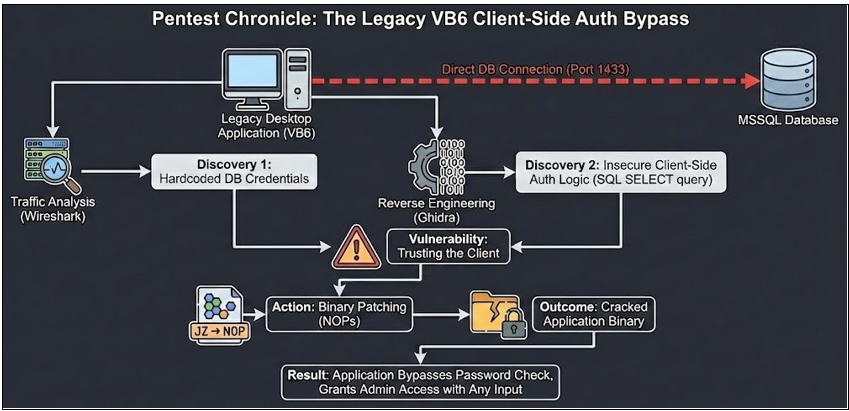
For the uninitiated, testing these applications is often a binary experience: either they are impenetrable fortresses of obscurity, or they fall apart like a house of cards. This one was definitely the latter. The First Thread: Direct Database Connection Our first step was traffic analysis. We fired up Wireshark to see who the application was talking to. We expected to see HTTP/HTTPS traffic communicating with a backend API. Instead, we saw direct TCP traffic on port 1433.
The application was communicating directly with an MSSQL database. If the client talks directly to the DB, it must possess the credentials to do so.
A quick strings analysis of the binary (and later confirmed via decompilation) revealed the “keys to the kingdom”: hardcoded database credentials.
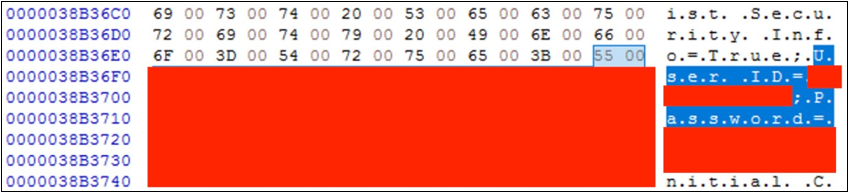 At this point, we could simply connect to the database using a tool like DBeaver or HeidiSQL and dump all the data. Technically, we had already won. But we wanted to see how deep the rabbit hole went. Specifically, regarding the application’s authentication logic.
The „Authentication” Mechanism
We asked ourselves: “If the application connects to the DB using hardcoded credentials, how does it verify the actual human user logging in?”
At this point, we could simply connect to the database using a tool like DBeaver or HeidiSQL and dump all the data. Technically, we had already won. But we wanted to see how deep the rabbit hole went. Specifically, regarding the application’s authentication logic.
The „Authentication” Mechanism
We asked ourselves: “If the application connects to the DB using hardcoded credentials, how does it verify the actual human user logging in?”
We loaded the binary into Ghidra to analyze the login routine. What we found was a textbook example of Insecure Client-Side Authentication.
The logic went roughly like this:
1. User enters Login and Password in the GUI.
2. The application (client-side) constructs a raw SQL query:
 3. The application sends this query to the DB.
4. If the DB returns a row, the application says: “Access Granted.”
5. If the DB returns nothing, the application shows a “Bad Password” error.
The critical flaw: The server (database) isn’t deciding if you are logged in. The application running on your computer decides. And since we control the computer, we control the decision. Developing the Crack
To demonstrate the severity of this flaw to the client, we decided to go beyond a simple report. We decided to create a crack - a modified version of the executable that bypasses the password check entirely.
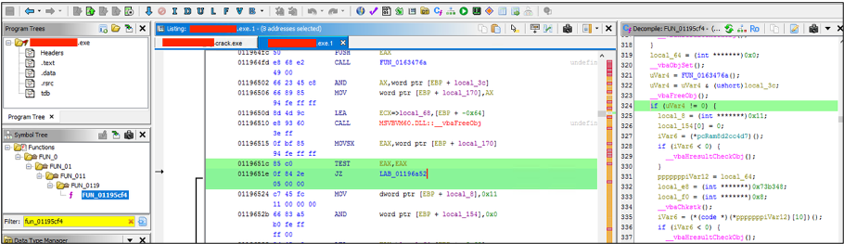 Using Ghidra, we located the assembly instructions responsible for the logic described above.
We identified a conditional jump instruction (specifically a JZ / JNZ - Jump if Zero/Not Zero). This instruction checked the result of the SQL query.
• Original Logic: If the query result is empty -> Jump to “Error Message”.
We didn’t need a valid password. We just needed to stop the application from jumping to the error message.
The Patch: We replaced the conditional jump instruction with NOPs (No Operation - 0x90). In assembly, this effectively tells the processor: “Do nothing here, just continue to the next line.”
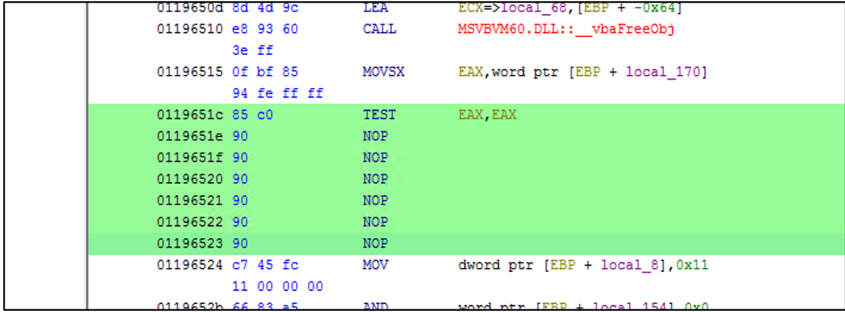
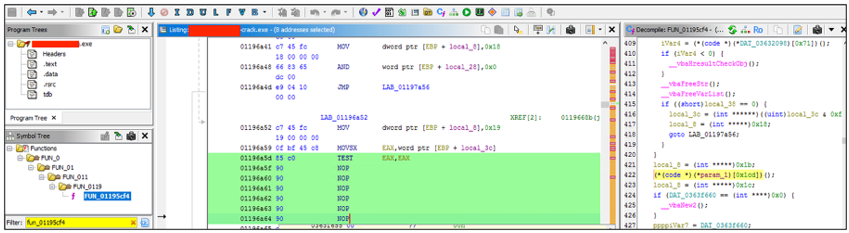 By overwriting the jump, we forced the code execution to fall through directly into the “Login Successful” routine, regardless of what the database returned.
The Result
We saved the modified binary and launched it.
By overwriting the jump, we forced the code execution to fall through directly into the “Login Successful” routine, regardless of what the database returned.
The Result
We saved the modified binary and launched it.
Username: admin
Password: I_dont_know_the_password
Click: Login
Result: We were logged in as the administrator.
The application, now “lobotomized” by our NOPs, didn’t care that the database returned zero results for that password. It simply proceeded to grant us access to the main interface. Because the application trusted the client to handle security, removing that check on the client removed the security entirely.
 Summary
This finding highlights a critical architectural rule: Never trust the client.
Summary
This finding highlights a critical architectural rule: Never trust the client.
Validation of credentials must happen on a trusted server (via an API or Middleware), or through native database authentication where the database itself rejects the connection. Relying on a boolean check inside a binary that the user controls is equivalent to asking a burglar to please check if the door is locked and believing them when they say “yes”.
Key Takeaways
• Do not embed database credentials in client binaries. They can always be extracted.
• Do not use direct SQL connections from client apps. Use a middleware API (REST/gRPC) to handle business logic and authentication.
• Client-side logic is mutable. Attackers can patch, hook, or modify your application code to bypass checks that don’t have a server-side counterpart.
Next Pentest Chronicles
When Usernames Become Passwords: A Real-World Case Study of Weak Password Practices
Michał WNękowicz
9 June 2023
In today's world, ensuring the security of our accounts is more crucial than ever. Just as keys protect the doors to our homes, passwords serve as the first line of defense for our data and assets. It's easy to assume that technical individuals, such as developers and IT professionals, always use strong, unique passwords to keep ...

SOCMINT – or rather OSINT of social media
Tomasz Turba
October 15 2022
SOCMINT is the process of gathering and analyzing the information collected from various social networks, channels and communication groups in order to track down an object, gather as much partial data as possible, and potentially to understand its operation. All this in order to analyze the collected information and to achieve that goal by making …

PyScript – or rather Python in your browser + what can be done with it?
michał bentkowski
10 september 2022
PyScript – or rather Python in your browser + what can be done with it? A few days ago, the Anaconda project announced the PyScript framework, which allows Python code to be executed directly in the browser. Additionally, it also covers its integration with HTML and JS code. An execution of the Python code in …